
Introduction to federated machine learning
How to train a model on data you can never copy — a hands-on introduction to federated learning with Flower AI and TensorFlow.


While building your own machine learning models — image classifiers, recommendation engines or chatty GPT models — you may quickly run into common issues: a lack of data to learn from or, conversely, a shortage of computing power when you have a surplus of data, as well as privacy concerns and a system that can’t scale with your training.
With the growing use of mobile and IoT devices, a vast amount of data lives on end-users’ devices or in private companies’ storage. It could be an excellent source for training your model, but in many cases you simply cannot copy it into your own storage. There is, however, a way to train a model without ever moving the data to your disks. This is where federated machine learning comes in.
What is federated machine learning?
In the vast land of the internet we can find a few interesting definitions.
Federated learning (also known as collaborative learning) is a sub-field of machine learning focusing on settings in which multiple entities (often referred to as clients) collaboratively train a model while ensuring that their data remains decentralized. [1]
In federated optimization, the devices are used as compute nodes performing computation on their local data in order to update a global model. (…) Additionally, since different users generate data with different patterns, it is reasonable to assume that no device has a representative sample of the overall distribution. [2]
Federated learning is a way to train AI models without anyone seeing or touching your data, offering a way to unlock information to feed new AI applications. [3]
These three quotes describe federated learning well. The learning process no longer happens on one centralised machine. Instead, each client trains its own version of the global model, and those partial models are then merged back into one global model.
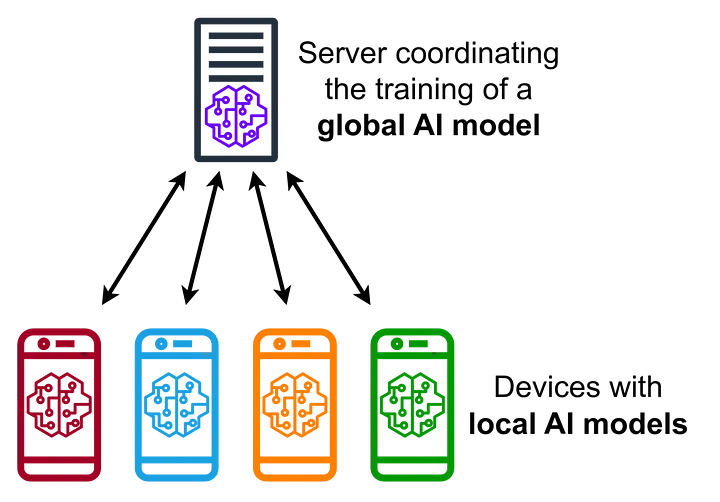
You may wonder: if every client trains its own local model, how do we end up with one final model? There are a few ways to combine local models, but at the beginning you will most likely deal with one called federated averaging.
In this approach the server sends weights (also called parameters) to a group of selected clients. The weights may come from a model pre-trained on a small batch of data you own, or be completely random at the start. Each client rebuilds the local model with those weights, trains it briefly on its own data and sends the new weights back. When the server receives them all, it computes a weighted average to create new global weights, sends them to the clients again, and the whole process repeats a few times before the final model is built.
With a high-level picture of how it works, we can build an example. To make our lives easier, we won’t implement everything ourselves — we’ll use one of the available federated learning frameworks: Flower AI.
What is Flower AI?
Flower AI describes itself as a unified approach to federated learning, analytics and evaluation that federates any workload, with any machine learning framework and any programming language. Whether you prefer PyTorch, TensorFlow, JAX or fastai, you are free to choose. It does so while addressing major concerns such as data privacy, geographically distributed data and devices with limited computing power, like smartphones or IoT devices.
It is flexible, scalable and doesn’t compromise private data. Flower AI comes with quick-start projects and detailed documentation covering many use cases — you can find more at flower.ai.
What will we build?
We will build the “hello world” of machine learning — an image classifier, specifically one for handwritten letters. We will have three clients, each with about 250 samples spread across ten classes (the letters A to J). We will use TensorFlow as the machine learning framework and Flower AI to federate the training. In this example the server and the clients run locally, but they could just as well talk over a network.
To follow along, install the following packages:
pip install flwr tensorflow matplotlib scikit-learnBuilding the model
If you have some experience with TensorFlow, nothing here will surprise you. We start with a fairly common convolutional network, often used for image classification.
def get_model() -> keras.Model:
    model = keras.Sequential([
        keras.layers.Input(shape=(100, 100, 1)),
        keras.layers.Conv2D(8, 5, activation='relu', kernel_initializer='variance_scaling'),
        keras.layers.MaxPooling2D(strides=(2, 2)),
        keras.layers.Conv2D(16, 3, activation='relu', kernel_initializer='variance_scaling'),
        keras.layers.Flatten(),
        keras.layers.Dense(units=10, activation='softmax', kernel_initializer='variance_scaling')
    ])

    model.compile(optimizer='adam', loss='sparse_categorical_crossentropy', metrics=['accuracy'])

    return model
It may not be the most advanced convolutional network you’ve seen, but for demonstration purposes it works quite well, so let’s stick with it.
Server-side application
Now we need a server to orchestrate training — this is where Flower AI really comes in. It lets us choose the learning strategy. We’ll go with one of the most common federated aggregation strategies, customised a little.
First, the current accuracy should be printed after each training round. We achieve this by extending aggregate_evaluate and using the metrics sent by the clients. Second, the model should be saved after each round, which we handle by extending aggregate_fit and storing the current model in a location of our choice.
class CustomStrategy(fl.server.strategy.FedAvg):
    def aggregate_evaluate(self, server_round: int, results: List[Tuple[ClientProxy, EvaluateRes]], failures: List[Union[Tuple[ClientProxy, EvaluateRes], BaseException]]) -> Tuple[Optional[float], Dict[str, Scalar]]:
        if not results:
            return None, {}

        loss, metrics = super().aggregate_evaluate(server_round, results, failures)
        accuracies = [r.metrics["accuracy"] * r.num_examples for _, r in results]
        examples = [r.num_examples for _, r in results]

        accuracy = sum(accuracies) / sum(examples)
        log(INFO, f"Round {server_round} accuracy aggregated from {len(results)} clients: {accuracy}")

        return loss, {"accuracy": accuracy}

    def aggregate_fit(self, server_round: int, results: List[Tuple[ClientProxy, FitRes]], failures: List[Union[Tuple[ClientProxy, FitRes], BaseException]]) -> Tuple[Optional[Parameters], Dict[str, Scalar]]:
        parameters, metrics = super().aggregate_fit(server_round, results, failures)

        if parameters is not None:
            model = get_model()
            model.set_weights(fl.common.parameters_to_ndarrays(parameters))
            model.save(f"models/model-round-{server_round}.keras")
            log(INFO, f"Saving round {server_round} model")

        return parameters, metrics
With that ready, we prepare the server by defining its address and the number of training rounds. We’ll pass both as command-line arguments when starting the script.
def main(server_address: str, num_rounds: int) -> None:
    fl.server.start_server(
        server_address=server_address,
        config=fl.server.ServerConfig(num_rounds=num_rounds),
        strategy=CustomStrategy(min_available_clients=3, min_fit_clients=3, min_evaluate_clients=3),
    )


if __name__ == "__main__":
    parser = argparse.ArgumentParser(description='Server')
    parser.add_argument('--server-address', type=str, required=True)
    parser.add_argument('--num-rounds', type=int, required=True)
    args = parser.parse_args()

    main(server_address=args.server_address, num_rounds=args.num_rounds)
For a more detailed view of training, we can plot how accuracy and loss change per round. start_server returns a history object we can use to draw the chart.
def plot(history: fl.server.history.History) -> None:
    accuracy = history.metrics_distributed["accuracy"]
    accuracy_index = [data[0] for data in accuracy]
    accuracy_value = [100.0 * data[1] for data in accuracy]

    loss = history.losses_distributed
    loss_index = [data[0] for data in loss]
    loss_value = [data[1] for data in loss]

    plt.plot(accuracy_index, accuracy_value, "r-", label="Accuracy")
    plt.plot(loss_index, loss_value, "b-", label="Loss")
    plt.grid()
    plt.xlabel("Round")
    plt.ylabel("Accuracy (%)")
    plt.title("Handwritten Letters Classifier - Federated Accuracy")
    plt.show()


def main(server_address: str, num_rounds: int) -> None:
    history = fl.server.start_server(...)
    plot(history)
Client-side application
With the server ready, we build the client. We extend NumPyClient from Flower AI and implement get_parameters, fit and evaluate.
get_parameters returns the weights of the current model. fit trains the model and returns a tuple of the new weights, the size of the training dataset (needed for weighted averaging on the server) and any metrics we care about. evaluate checks the model’s progress and returns the loss, the size of the validation dataset and the metrics we want to send to the server.
class Client(fl.client.NumPyClient):
    def __init__(self, model: keras.Model, trainset: tf.data.Dataset, validset: tf.data.Dataset):
        self.model = model
        self.trainset = trainset
        self.validset = validset

    def get_parameters(self, config: Dict[str, Scalar]) -> NDArrays:
        return self.model.get_weights()

    def fit(self, parameters: NDArrays, config: Dict[str, Scalar]) -> Tuple[NDArrays, int, Dict[str, Scalar]]:
        self.model.set_weights(parameters)
        self.model.fit(self.trainset, epochs=1, batch_size=32)
        return self.model.get_weights(), len(self.trainset), {}

    def evaluate(self, parameters: NDArrays, config: Dict[str, Scalar]) -> Tuple[float, int, Dict[str, Scalar]]:
        self.model.set_weights(parameters)
        loss, accuracy = self.model.evaluate(self.validset)
        return loss, len(self.validset), {"accuracy": accuracy}
Next, we load the training data. Keras’ image_dataset_from_directory splits it into training and validation sets for us. Our images are 100×100 px and black and white, so we load them in grayscale to skip unnecessary colour channels.
def get_datasets(data_dir: str) -> tf.data.Dataset:
    datasets = keras.utils.image_dataset_from_directory(
        directory=data_dir,
        validation_split=0.1,
        subset="both",
        color_mode="grayscale",
        image_size=(100, 100),
        shuffle=True,
        batch_size=32,
        seed=522437,
    )
    return datasets
Now we can start the client. It needs the server address and the path to its data, which in this example lives in a subdirectory on the local disk.
def main(server_address: str, data_dir: str) -> None:
    trainset, validset = get_datasets(data_dir)
    model = get_model()

    fl.client.start_numpy_client(
        server_address=server_address,
        client=Client(model, trainset, validset)
    )


if __name__ == "__main__":
    parser = argparse.ArgumentParser(description='Client')
    parser.add_argument('--server-address', type=str, required=True)
    parser.add_argument('--data-dir', type=str, required=True)
    args = parser.parse_args()

    main(server_address=args.server_address, data_dir=args.data_dir)
Let’s start training
With both applications ready, we start them in separate terminal sessions. Our setup needs one server and three clients, and the server has to start first.
python server.py --server-address=0.0.0.0:8080 --num-rounds=6
python client.py --server-address=127.0.0.1:8080 --data-dir=./data/client-1
python client.py --server-address=127.0.0.1:8080 --data-dir=./data/client-2
python client.py --server-address=127.0.0.1:8080 --data-dir=./data/client-3
You will see fairly verbose output with learning progress, successful and failed sessions, accuracy and loss. At the end a chart appears: the red line shows accuracy and the blue line shows loss in each round.
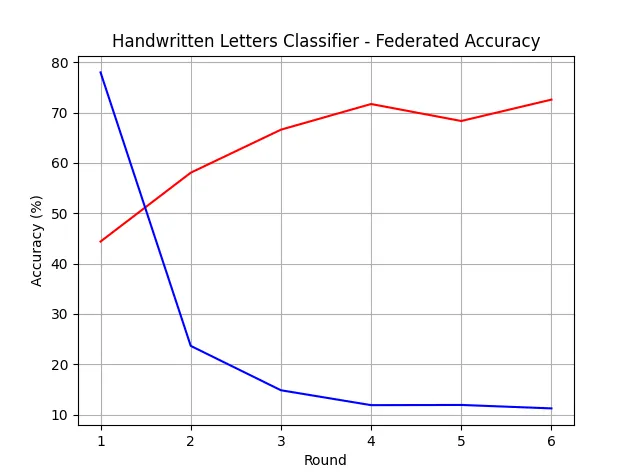
Thanks to our strategy, the model is also saved in the models directory after each round. We can try it on some handwritten letters — the script below loads the model and predicts the letter in a given image.
class_names = ['a', 'b', 'c', 'd', 'e', 'f', 'g', 'h', 'i', 'j']


def main(model_path: str, image_path: str) -> None:
    model = keras.models.load_model(model_path)

    image = keras.utils.load_img(image_path, target_size=(100, 100), color_mode="grayscale")
    image = keras.utils.img_to_array(image)
    image = tf.expand_dims(image, 0)

    prediction = model.predict(image)
    score = tf.nn.softmax(prediction[0])

    print(
        "This image most likely belongs to {} with a {:.2f} percent confidence."
        .format(class_names[np.argmax(score)], 100 * np.max(score))
    )


if __name__ == "__main__":
    parser = argparse.ArgumentParser(description='Validator')
    parser.add_argument('--model-path', type=str, required=True)
    parser.add_argument('--image-path', type=str, required=True)
    args = parser.parse_args()

    main(args.model_path, args.image_path)
Run it with the following command:
python predict.py --image-path=./data/client-2/g/1691660116597.png --model-path=./models/model-round-6.kerasThe output reads: This image most likely belongs to ’g’ with a 23.20 percent confidence. Not very confident, but it guessed the letter correctly after all.
Finally, a confusion matrix gives a clearer picture of per-class performance. We can generate it with the following code.
class_names = ['a', 'b', 'c', 'd', 'e', 'f', 'g', 'h', 'i', 'j']


def get_test_data(data_dir: str) -> Tuple[np.ndarray, np.ndarray]:
    dataset = keras.utils.image_dataset_from_directory(
        directory=data_dir,
        color_mode="grayscale",
        image_size=(100, 100),
        shuffle=True,
        batch_size=32,
        seed=522437,
    )
    test_images, test_labels = zip(*dataset.unbatch().as_numpy_iterator())
    test_images = np.array(test_images)
    test_labels = np.array(test_labels)

    return test_images, test_labels


def main(model_path: str, data_dir: str) -> None:
    model = keras.models.load_model(model_path)
    test_images, test_labels = get_test_data(data_dir)

    predictions = model.predict(test_images)
    predicted_labels = np.argmax(predictions, axis=1)

    matrix = confusion_matrix(test_labels, predicted_labels, labels=range(10))
    display = ConfusionMatrixDisplay(confusion_matrix=matrix, display_labels=[s[-1] for s in class_names])
    display.plot(cmap=plt.cm.Blues, values_format='.4g')

    plt.show()


if __name__ == "__main__":
    parser = argparse.ArgumentParser(description='Validator')
    parser.add_argument('--model-path', type=str, required=True)
    parser.add_argument('--data-dir', type=str, required=True)
    args = parser.parse_args()

    main(args.model_path, args.data_dir)
Run it with the command below.
python confusion.py --model-path=./models/model-round-6.keras --data-dir=./data/client-2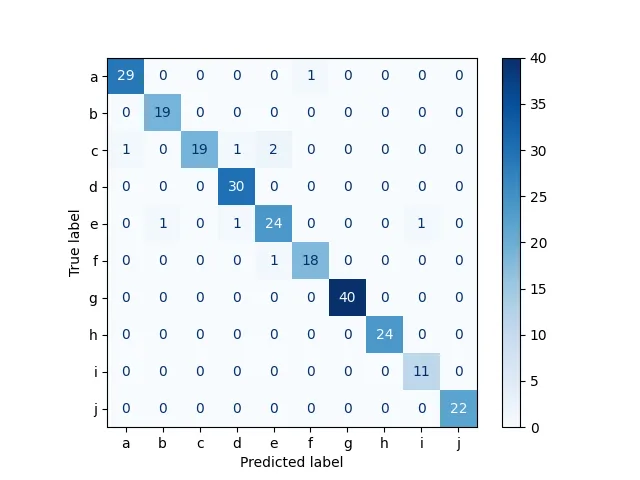
Note that this isn’t truly representative, as the evaluation data overlaps with the training data — but it serves the purpose of the demonstration :)
Summary
Federated machine learning is more involved than its centralised counterpart, but it unlocks possibilities that are otherwise out of reach — especially when data privacy or geographic distribution are hard constraints. It is worth considering whenever the data cannot come to the model.
